Summary
Before moving further into labs, I wanted to improve the tenant’s baseline security. My personal environment includes Windows, Mac, and iOS, but for my dev tenant I bought a cheap Poco Phone to use as a device for MaM/MDM testing. I will be adding compliance policies and conditional access policies to enhance security as well as creating and adding a managed Google Play account for Android Management.
Objective
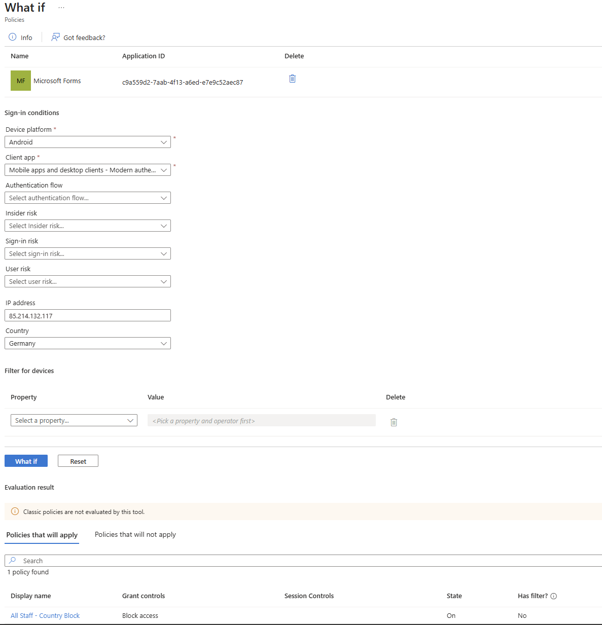
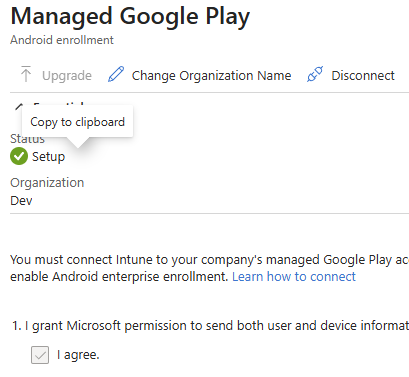
My objective was to create compliance policies for Windows and Android, connect Managed Google Play for Android Enterprise management, disable the setting that treats unmanaged devices as compliant, and replace security defaults with more targeted Conditional Access controls. I also wanted to build an example Conditional Access policy that blocks sign-ins from outside the United Kingdom.
What I Configured
- Disabled the setting that treats unmanaged devices as compliant
- Connected Managed Google Play under Android enrollment
- Disabled security defaults for more granular Conditional Access policies
- Built Windows and Android compliance policies
- Created a Conditional Access location-based block policy for non-UK sign-ins
Windows Compliance Policy
Platform: Windows 10 and later
Profile type: Windows 10/11 compliance policy
Name: CMW IT Windows Compliance Policy
Description: Default policy for standard CMW IT devices
Device health: Require BitLocker, Secure Boot, and Code Integrity
Device properties: Minimum OS version 10.0.26100 (Windows 11 24H2)
System security: Require password, block simple passwords, minimum length 8, password expiration 41 days, require encryption, require firewall, require TPM, require antivirus and antispyware
Android Compliance Policy
Platform: Android Enterprise
Profile: Personally-owned work profile
Name: CMW IT Android Compliance Policy
Description: Default policy for standard CMW IT Android devices
Device health: Block rooted devices, require Google Play Services to be configured
Device properties: Minimum OS version 12
System security: Block apps from unknown sources, enable Company Portal runtime integrity, block USB debugging, require password to unlock, password expiration 60 days, prevent reuse of last 3 passwords, require passcode after 5 minutes of inactivity, password complexity set to medium
Work profile: Mirrored the same password and security expectations for the work profile
Conditional Access Approach
Policy name: All Staff - Country Block
Users: Include all users, with one admin account excluded
Target resources: All cloud apps
Network: Exclude United Kingdom
Device platform: Any device
Grant control: Block access
Outcome
Although I have done these tasks many times at work. This setup reinforced that initial tenant hardening matters. If the starting point is too relaxed, it opens doors.. Tightening the compliance defaults and using Conditional Access closes the door early on for potential security threats. Initial security tasks are often overseen for much larger tasks. If you are an MSP that has just inherited a tenant how do you know it's secure? How do you know the conditional access policies are working? It is always important to spend a hour or 2 reviewing these before bigger tasks.
This has helped me gain knowledge of how to add a Managed Google Play account to Intune which is useful for my MD-102
Screenshots
Click any screenshot to enlarge it.
Screenshot 2. Built-in compliance setting changed so devices with no assigned compliance policy are marked as not compliant.

Screenshot 3. Managed Google Play connected for Android Enterprise enrolment and management.
Screenshot 4. Conditional Access policy configured to block access outside the United Kingdom.