Summary
My first exposure to Active Directory was when I built a Windows Server 2008 VM at home at around 14 years old. Since then, I’ve worked in both college and MSP environments, which opened me up to Microsoft 365, endpoint support, and production systems.
Objective
The problem is that production environments are not the place to freely experiment, break things, or prepare properly for certifications. Because of that, I decided to build a separate development tenant and hybrid setup so I could test, learn, and prepare for MD-102 without risking my personal environment.
Objective
My objective was to configure a new Microsoft 365 tenant and Active Directory environment to create a hybrid setup using Microsoft Entra Connect. As part of that, I also wanted to enable automatic device enrolment through Group Policy so I could begin building a more realistic Intune lab for MD-102 exam preparation.
Environment
- A new Microsoft 365 tenant created for testing
- Added a new domain controller, DC02, to my second hypervisor
- Hyper-V on my PC with two Windows 11 VMs
- One Microsoft Entra hybrid joined device and one Microsoft Entra joined device
- Microsoft Entra Connect
What I Configured
- Promoted DC02 as a domain controller
- Added dev.calebwhorton.com as a UPN suffix in Active Directory Domains and Trusts
- Installed Microsoft Entra Connect and created a new account with the Enterprise Admin group
- Enabled password hash synchronisation and writeback
- Enabled seamless single sign-on
- Configured Enable automatic MDM enrolment using default Microsoft Entra credentials Group Policy
Outcome
The end result was a working hybrid lab environment that now gives me a proper base for Microsoft 365 and Intune testing. Devices were registering successfully, hybrid identity was in place, and the environment was ready for future enrolment and compliance testing.
Lessons Learned
This is a much better setup for learning than relying only on production exposure or limited home testing because it gives me room to experiment properly and build repeatable documentation around what I’m doing.
Outcome
This build reinforced that the identity side has to be right before the rest of the endpoint work becomes meaningful. Before getting into compliance policies, Conditional Access, app protection, or device configuration, the hybrid identity layer needs to be in place first.
Screenshots
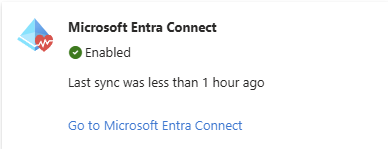
Microsoft Entra Connect showing the sync service enabled and healthy, confirming that the hybrid identity connection is active and syncing successfully.

Device list showing the hybrid environment coming together, including registered devices, join type, Microsoft Intune management state, and compliant status where expected.
Next Steps
From here, the next stage is to build on top of this with compliance policies, Conditional Access, and further MD-102-focused labs. This post acts as the starting point for that progression.